10 Best Clipping Software for Editing and Sharing Game Highlights

After testing every major clipping tool, Insights.gg stands out for automatic capture with no measurable FPS drop across 10,000+ games. It clips every highlight without a hotkey and makes editing or team reviews quick and intuitive. Compared to Outplayed or Medal.tv, it is the only free-forever option with a built-in team VOD review tool — one of the best clipping software choices for 2026.
Last updated: September 2, 2026. Tested on Windows 11 across Valorant, CS2, Fortnite and League of Legends.
Every gamer knows the feeling - you pull off an insane play, your heart’s racing, your friends are screaming… and then you realize you weren’t recording.
That’s where clipping software saves the day! Whether you’re chasing viral moments, building a highlight reel, or just want to relive your best plays, the right tool can turn those “did you see that?!” moments into polished clips in seconds.
From automatic capture to built-in editing, here are the 10 best clipping software for PC in 2026 — free clipping software and paid game clipping software alike — to help you record, edit, and share your gaming highlights with ease.
Clipping Software Compared at a Glance
| Software | Automatic capture | FPS impact | Built-in editor | Free tier | Platform |
|---|---|---|---|---|---|
| Insights.gg / Insights Capture | Yes, fully automatic, 10,000+ games | No measurable drop | Yes, plus team VOD review | Free forever, 5GB active storage | Windows |
| Outplayed (Overwolf) | Yes, in supported titles | Low to moderate | Trim and share | Free, some premium features | Windows |
| Medal.tv | Hotkey, partial auto-detect | Low | Yes | Free, 10-minute clip cap | Windows, macOS, mobile |
| NVIDIA ShadowPlay | Instant Replay, manual save | Very low, GPU encoded | No | Free with NVIDIA GPU | Windows, NVIDIA only |
| SteelSeries Moments | Yes, limited game list | Low | Basic trim | Free | Windows |
| EaseUS RecExperts | No, manual only | Moderate | Yes | Limited free tier, then paid | Windows, macOS |
| Powder AI | Discontinued | n/a | n/a | No longer supported | n/a |
| Allstar.gg | Yes, competitive titles only | Low | Template-based | Free, premium tier available | Windows |
| Xbox Game Bar | No | Low | Basic trim | Free, built into Windows | Windows |
| Cutlabs | AI post-processing, not live | n/a, cloud based | Yes | Subscription required | Web |
Insights.gg is the only tool in this comparison that combines fully automatic capture across 10,000+ games, no measurable FPS cost, a built-in editor, and a collaborative VOD review tool — all on a free-forever plan.
Highlights
- Quick and easy editing: Discover tools that simplify trimming, merging, and enhancing clips instantly.
- Cross-platform compatibility: Learn about software that works across PC, consoles, and mobile devices.
- Social sharing made simple: Find out which tools make it easy to upload directly to YouTube, TikTok, and Twitch.
What Is Clipping Software?
Clipping software is designed to capture short segments of your gameplay, allowing you to highlight memorable moments like headshots, victories, or funny in-game events. Unlike traditional recorders that store entire sessions, these tools help you quickly trim and edit segments for instant sharing. The best clipping software for PC runs in the background, uses automatic highlight detection to clip gameplay for you, and turns those quick clips into a highlight reel without a separate video editing app.
Interestingly, research shows that automated highlight generation in gaming can detect “interesting events” with over 90% accuracy when using modern AI models. This level of precision means you’re more likely to catch those peak plays without manually watching entire matches.
Main capabilities include:
- Instant replay: Automatically record the last few minutes of gameplay.
- Basic editing tools: Trim, crop, and merge video segments.
- Audio sync: Record mic audio, voice chat or commentary along with gameplay.
- Cloud storage: Save clips online and access them from any device.
With these features, gamers can efficiently turn live action into professional-looking highlight reels.
The 10 Best Game Clipping Software for PC, Ranked
1. Insights.gg / Insights Capture
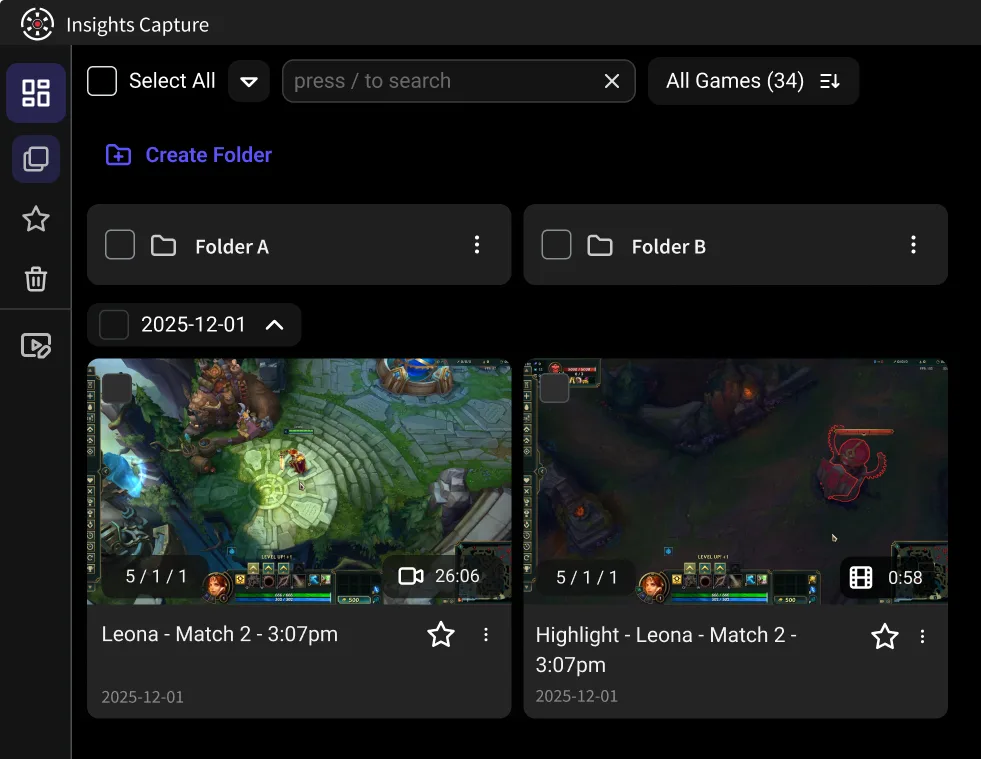
Insights is a free clipping software for Windows that automatically records and clips your highlights across more than 10,000 PC games with no measurable FPS drop. It is used by over 5 million gamers, is free forever with no watermark, and is the only tool in this comparison that pairs automatic clipping with a full team VOD review workflow.
The companion app, Insights Capture, runs quietly in the background while you play. It automatically detects in-game events like kills, wins, and clutch plays, recording and trimming those moments so you never miss a highlight. You can also use hotkeys to capture manually or enable instant replay to save the last few minutes of action when something exciting happens.
After your match, the Insights dashboard opens automatically, allowing you to watch, edit, and export clips directly within the app, no external editors needed. You can even share highlights with teammates or post them online, and earn Shards for the time you spend playing, redeemable for Amazon, Steam and Visa gift cards.
Pros:
- Fully automatic clipping across 10,000+ games, no hotkey required.
- No measurable FPS drop, so competitive play is unaffected.
- Combines recording, editing, and sharing in one seamless platform.
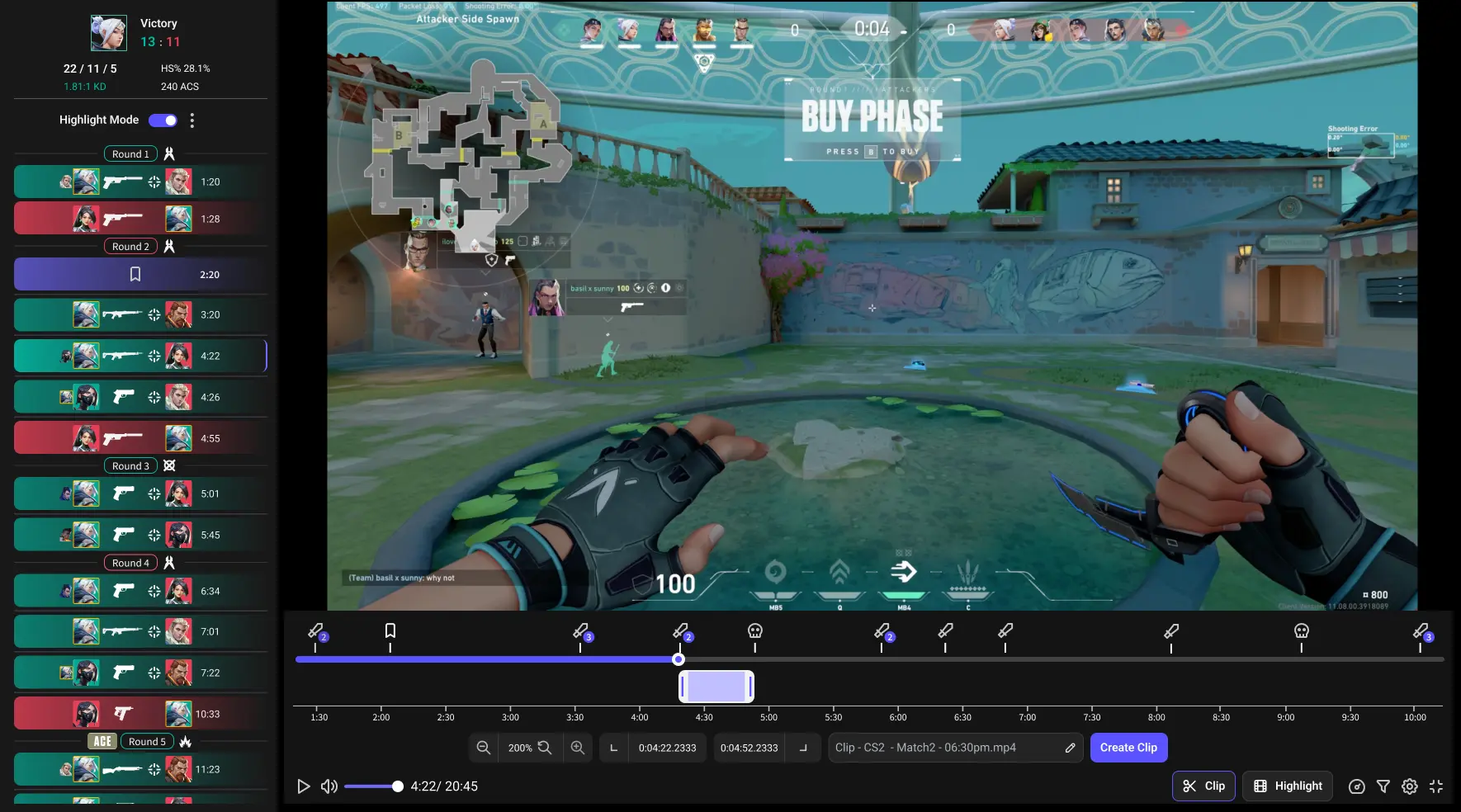
- Includes a VOD review tool for collaborative gameplay analysis.
- Free plan is free forever with 5GB active storage, no watermark and no trial period.
- Earn Shards for playtime, redeemable for gift cards.
Cons:
- Available for Windows only (for now).
Why It’s the Best:
{{button}}
Most clipping tools handle either recording or editing, but Insights Capture brings the full workflow into one streamlined system. You play, it records, and your best moments are waiting for you right after the match. Whether you’re a casual gamer or building an esports brand, it’s the most complete clipping solution available in 2026.
2. Outplayed (Overwolf)
Outplayed runs on the Overwolf platform and automatically captures major in-game events like kills or wins in supported titles, trimming them into shareable clips.
Pros:
- Beginner-friendly.
- Automatic highlight capture.
- Supports lots of games.
Cons:
- Slight performance dips on lower-end PCs
- No live streaming
Good for: Casual players who want fast, no-fuss highlight recording.
3. Medal.tv
Medal.tv records in the background and uploads short clips to the cloud for quick social sharing. Capture is mainly hotkey-driven, with partial auto-detection in some titles.
Pros:
- Cloud sync.
- Ideal for short-form sharing.
- Polished interface.
Cons:
- Free users are capped at 10-minute clips.
- Limited storage.
- Slight performance dips on lower-end PCs.
Good for: Creators who love sharing clips to TikTok, YouTube Shorts, or Discord.
4. NVIDIA ShadowPlay
Bundled with the NVIDIA app, ShadowPlay uses your GPU’s hardware encoder for minimal FPS loss. Clips are saved manually via Instant Replay rather than detected automatically.
Pros:
- Low performance impact.
- Great video quality.
- Built-in replay.
Cons:
- NVIDIA GPUs only.
- Limited editing options.
Good for: PC gamers who want seamless, high quality recording.
5. SteelSeries Moments
SteelSeries Moments captures top gaming moments from a supported game list and integrates with SteelSeries peripherals. Lightweight, with a basic trim editor.
Pros:
- Easy to use.
- Clean interface.
- Built for quick sharing.
Cons:
- Basic editor.
- Limited game support.
Good for: Casual players who want effortless highlight clips.
See more: How to record Valorant?
6. EaseUS RecExperts
A general-purpose screen recorder rather than a gaming tool. Flexible region capture, a simple user interface and solid editing tools, but no automatic highlight detection.
Pros:
- Highly customizable.
- Supports multiple formats.
Cons:
- Lacks automated highlights.
- More manual setup.
Good for: Creators who want full recording control.
7. Powder AI
Powder.gg was once a go-to for gamers, thanks to its AI-driven highlight detection that effortlessly turned your top plays into shareable clips. The platform has since been discontinued and is no longer supported.
Pros:
- Auto-detects key moments.
- Fast social sharing.
Cons:
- The app is mostly unsupported; limited reliability.
- AI may misclassify moments.
Good for: Users who still have access but not ideal for new creators.
8. Allstar.gg
Allstar.gg auto-generates clips for a small set of competitive titles including CS2, Fortnite and League of Legends, with cloud storage and template-based edits.
Pros:
- Low FPS impact.
- Cloud storage.
- Great for competitive games.
Cons:
- Small game library.
- Premium features may require a subscription.
Good for: Esports players and high-performance PC users.
9. Xbox Game Bar
Already installed on Windows 10 and 11. Open the Xbox Game Bar overlay with Win+G to start recording or save a quick clip, with basic trimming and no automatic detection.
Pros:
- Free.
- No installation needed.
- Convenient.
Cons:
- Limited editing.
- Fewer automated highlight features.
Good for: Beginners or casual users.
10. Cutlabs
A cloud tool that uses AI to cut social-ready highlights from footage you upload. It edits recordings after the fact rather than capturing gameplay live.
Pros:
- Fast AI workflow.
- Ideal for short-form content.
Cons:
- Subscription required.
- Does not record gameplay itself.
Good for: Creators focused on quick, eye-catching content.
Honorable Mention: OBS Studio
OBS Studio is not strictly clipping software for gaming — it is a free, open-source recording and streaming program — but its replay buffer can save the last stretch of gameplay with a hotkey, and its webcam overlay and scene system give you full control over the output. The trade-off is a steeper learning curve: you configure everything yourself, there is no automatic clipping, and polishing clips happens in a separate editor. If you enjoy manual control, OBS Studio is the classic pick; if you want quick clips without the learning curve, the automatic tools higher on this list will serve you better.
How to Choose Between These Game Clipping Software Options
All ten game clipping software picks above solve the same problem in different ways, so match the tool to how you play:
- Casual clipping: if you only save spontaneous highlights now and then, Xbox Game Bar covers quick clips with zero setup and no extra software.
- Every highlight, automatically: if you want your gaming moments captured without touching a hotkey, automatic game clipping software like Insights Capture or Outplayed handles the video clipping for you.
- High quality recording on a budget: ShadowPlay and Insights Capture lean on hardware acceleration, so frame rates stay stable — ShadowPlay on an NVIDIA GPU only, Insights Capture on NVIDIA and AMD systems alike.
- Short clips for social: Medal.tv and Cutlabs are built around short clips and fast posting.
- Full recorders: OBS Studio and EaseUS RecExperts are closer to a complete recording suite with deeper editing tools and video editing control, at the cost of more setup.
Whichever way you lean, every free plan on this list is genuinely usable — try two or three clipping programs side by side before settling on the right tool.
Key Features to Look for in the Best Clipping Software
Choosing the best clipping software for PC ultimately depends on your recording needs, gaming setup, and preferred editing style. Whether you’re streaming, creating highlight reels, or saving memorable gameplay moments, the right tool should balance performance, quality, and ease of use. Below are the essential features to keep in mind before deciding:
- Ease of Use: A clean, intuitive interface makes recording and editing clips effortless. The best clipping tools are designed with gamers in mind, offering one-click recording, drag-and-drop editing, and easy navigation that helps you stay focused on gameplay rather than complex settings.
- Performance Efficiency: High CPU or GPU usage can ruin a gaming session. Look for clipping software that runs smoothly in the background without causing frame drops or lag. Many modern tools are optimized to record gameplay seamlessly while maintaining consistent performance.
- Editing Capabilities: Advanced editing features can elevate your highlight clips. Choose software that supports timeline editing, trimming, filters, and overlays. Some platforms even provide transitions, sound effects, and text tools to make your videos more engaging and professional.
- Export Flexibility: The ideal software should support multiple export formats like MP4, MOV, and AVI, along with resolutions up to HD or 4K. It should also let you customize frame rates and aspect ratios to match the requirements of streaming or social media platforms.
- Cloud and Sharing Options: Modern clipping tools often integrate with cloud storage and social media, allowing you to upload directly to YouTube, TikTok, Twitch, or Discord. This feature not only saves time but also ensures your best clips are always accessible across devices.
By focusing on these key areas, you’ll find a clipping solution that enhances both your gaming and content creation experience.
Watch more: How to record Fortnite?
FAQs: Best Clipping Software
1. What’s the best all-in-one clipping tool for gamers?
Insights.gg is widely recognized as one of the most complete clipping solutions available. It automatically records your matches, detects key in-game moments, and organizes your highlights instantly. With a built-in editor and cloud-based dashboard, you can trim, annotate, and share clips without leaving the platform, making it ideal for creators who value speed and efficiency.
2. What clipping software works best for esports and team gameplay?
For teams and competitive players, Insights.gg stands out with its integrated collaboration and review tools. Players and coaches can analyze matches together, comment directly on clips, and break down specific moments for tactical discussions. This makes it not just a clipping app, but a powerful performance and communication tool for esports organizations.
3. What’s the easiest way to capture and share gameplay highlights?
While apps like Medal.tv and Outplayed provide simple highlight capture, Insights.gg automates the entire process, from detection to editing and sharing. The system saves you time by identifying moments like kills or wins and preparing them for upload instantly, so you can focus on the game rather than manual editing.
4. Can I use clipping software on both PC and console?
Yes. Many modern clipping tools, including Insights.gg and Medal.tv, support cross-platform recording. You can capture highlights from PC games directly or use connected devices to import console gameplay for clipping and editing.
5. Does clipping software impact game performance?
Not significantly, if optimized correctly. Insights Capture is designed to run efficiently in the background with no measurable FPS drop, so players can capture every highlight without compromising in-game performance.
6. What is the best free clipping software for PC?
Insights Capture is the best free clipping software for PC if you want automatic capture, editing and sharing in one app with no watermark. Xbox Game Bar is the best zero-install option, NVIDIA ShadowPlay is the lightest manual recorder if you have an NVIDIA GPU, and OBS Studio is the pick for full manual control.
Conclusion
There are plenty of good clipping tools out there, but Insights.gg stands apart by combining automatic capture across 10,000+ games, no measurable FPS cost, built-in editing, and a collaborative VOD review tool, all on a free-forever plan. It’s not just a recording app, it’s a complete workflow solution for creators who want to save time and focus on what they love most: gaming. That combination is what earns it the top spot among the best game clipping software for PC in 2026.
Whether you’re building your channel, competing with your team, or just collecting your favorite highlights, Insights.gg makes it effortless. Play, clip, and share without missing a single moment. Contact us now!