10 Best Free Game Recorder Software in 2026

Tired of recorders that turn your game into a slideshow? Say goodbye to lag, watermarks, and endless settings menus. This blog breaks down the 10 best free game recorders in 2026, from instant highlight tools to pro-level capture apps that won’t fry your PC. Whether you’re rocking a high-end rig or a potato laptop, you’ll find a recorder that fits your setup (and your sanity). Spoiler: Insights Capture might just be the game-changer you didn’t know you needed.
Last updated: August 24, 2026. Tested on Windows 11 with NVIDIA and AMD hardware.
Recording your gameplay is essential for improving skills, creating content, or sharing your best moments with friends and followers. But not all recorders are created equal, some impact performance, add watermarks, or lack key features like high frame rate support and easy clipping.
To help you capture smooth, high-quality gameplay without breaking the bank, we’ve tested and compiled the 10 best free game recorder software options for 2026. These tools cater to a range of players, from competitive gamers and streamers to casual creators looking for quick, hassle-free recording.
Free Game Recorders Compared at a Glance
| Recorder | Automatic clipping | FPS impact | Built-in editor | Free tier | Platform |
|---|---|---|---|---|---|
| Insights Capture | Yes, fully automatic | No measurable drop | Yes, plus VOD review | Free forever, 5GB active storage | Windows |
| OBS Studio | Replay buffer, manual trigger | Low to moderate, configurable | No | Free, open source | Windows, macOS, Linux |
| NVIDIA ShadowPlay | Instant Replay, manual save | Very low, GPU encoded | No | Free with NVIDIA GPU | Windows, NVIDIA only |
| AMD Radeon ReLive | Instant Replay, manual save | Very low, GPU encoded | Basic trim | Free with AMD GPU | Windows, AMD only |
| Action! | No | Low, hardware accelerated | Trim only | Paid, free trial only | Windows |
| Xbox Game Bar | No | Low | Basic trim | Free, built into Windows | Windows |
| Gecata by Movavi | No | Low | Basic | Free trial, then paid | Windows |
| Medal.tv | Hotkey, partial auto-detect | Low | Yes | Free, clip length and storage limits | Windows, macOS, mobile |
| Outplayed by Overwolf | Yes, automatic | Low to moderate | Trim and share | Free, some premium features | Windows |
| FBX Game Recorder | No | Low, hardware accelerated | Basic trim | Free tier adds a watermark | Windows |
Only three tools on this list clip automatically without you pressing anything: Insights Capture, Outplayed, and partially Medal. Of those, Insights Capture is the only one that is free forever with no watermark and includes a team VOD review tool.
Why Use Free Game Recording Software in 2026
In 2026, the best free game recorder options have redefined performance and accessibility for gamers. Free recording tools now offer premium-level quality and features that were once limited to paid software. Whether you are streaming competitive matches, recording tutorials, or saving highlight clips, these recorders make it simple to capture smooth, high-quality, professional content without costly subscriptions or complicated setups.
The latest tools now include hardware-accelerated encoding, which leverages your GPU instead of your CPU to maintain stable FPS and reduce lag during recording. Many also feature instant replay and automatic highlight clipping, so you can save clutch moments without recording full sessions. Plus, with built-in editors and cloud-sharing integration, creators can easily trim, manage, and upload their clips within minutes, no third-party software required.
Gaming content continues to grow globally, with creators driving engagement across platforms like YouTube, TikTok, and Twitch. According to Statista Gaming Insights (2025), over 65% of gamers now record or share gameplay clips monthly. This shows that reliable, free game recording software isn’t just a convenience, it’s a must-have for every player looking to capture, share, and relive their best gaming moments.
Watch more: How to Make a Gaming YouTube Video for Beginners
Top 10 Free Game Recorder Software in 2026
1. Insights Capture (by Insights.gg)
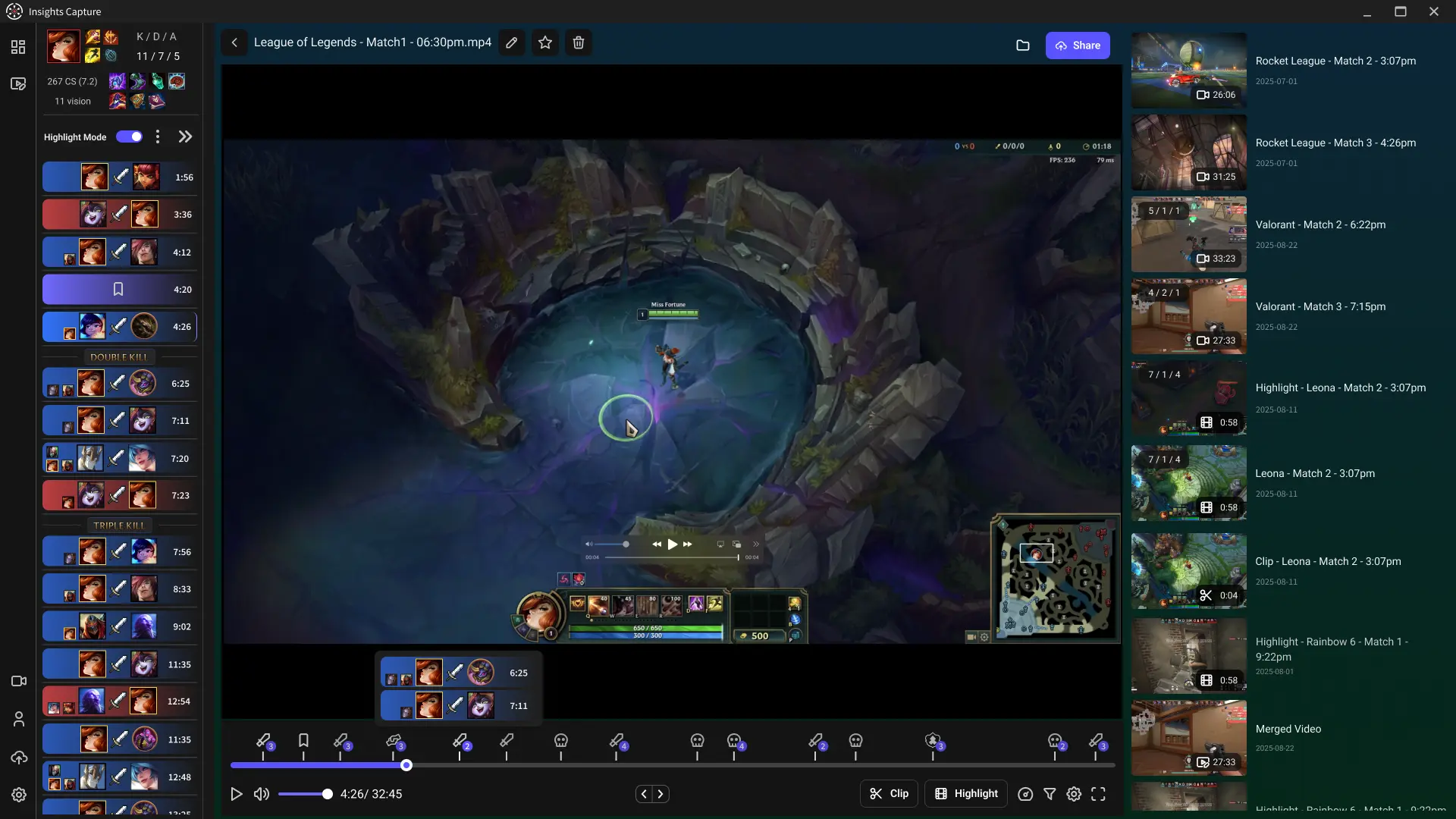
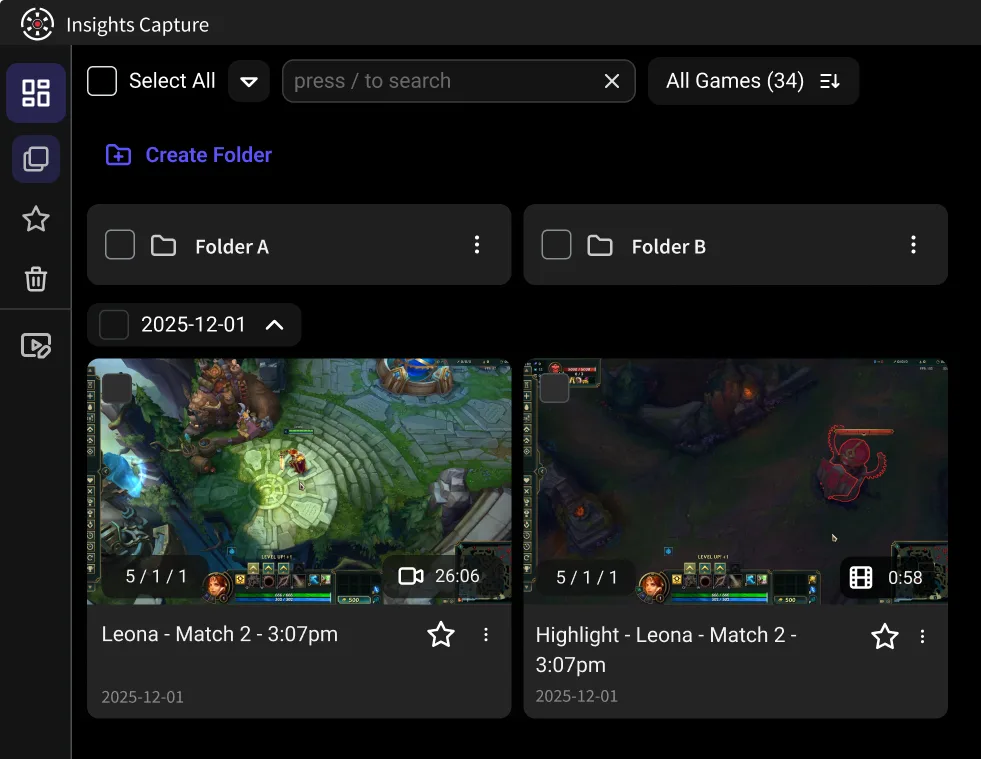
Insights Capture is a free game recorder for Windows that records every match automatically with no measurable FPS drop, supports more than 10,000 PC games, and is used by over 5 million gamers. It is free forever with no watermark and no time limit, and it is the only recorder on this list that pairs automatic capture with a full team VOD review tool.
Overview
Insights Capture runs in the background and starts recording the moment a match begins, with no hotkey and no setup. When your session ends, your clips are already trimmed and waiting in your Insights.gg library, where you can review, edit, and share them without exporting anything to another program.
Key Features
- Fully automatic recording across 10,000+ supported PC games, no hotkey required
- No measurable FPS drop, so competitive play is unaffected
- Instant highlight clipping into your Insights.gg library
- Team VOD review with timestamped comments and drawing tools
- Earn Shards for playtime, redeemable for Amazon, Steam, and Visa gift cards
- Free forever with 5GB active cloud storage, no watermark, no trial
Best For
Players who want hands-free recording and fast highlight review, especially competitive or team-based gamers.
Platform
Windows
{{button}}
With its seamless workflow and minimal system impact, Insights Capture isn’t just a recorder, it’s a complete content creation companion. From automatic highlight detection to instant sharing, it streamlines every part of the process so you can focus entirely on your gameplay. That combination of zero-setup automatic capture, no performance cost, and a built-in review workflow is what makes it the best free game recorder in 2026.
2. OBS Studio
Overview
Open-source recording and streaming software with granular control over encoding, sources, and overlays. Recording is manual or via replay buffer, and there is no built-in editor.
Key Features
- Fully customizable recording setup
- NVENC and x264 support
- Large plugin ecosystem
Best For
Streamers and advanced users who need detailed control.
Platform
Windows, macOS, Linux
3. NVIDIA ShadowPlay
Overview
Bundled with the NVIDIA app. Uses GPU encoding for low-overhead capture and offers Instant Replay to save the preceding minutes on a hotkey. Requires an NVIDIA GPU.
Key Features
- Instant replay mode
- Hotkey-based recording
- Low performance overhead on NVIDIA GPUs
Best For
Users with NVIDIA GPUs who want lightweight performance-friendly recording.
Platform
Windows (NVIDIA GPU required)
4. AMD Radeon ReLive
Overview
AMD’s equivalent to ShadowPlay, bundled with Radeon Adrenalin. GPU-accelerated capture with instant replay and basic trimming. Requires an AMD GPU.
Key Features
- Instant replay capabilities
- Low system overhead
- Easy GPU-powered recording
Best For
Users with AMD GPUs wanting efficient recording.
Platform
Windows (AMD GPU required)
5. Action!
Overview
A paid recorder from Mirillis with a time-limited free trial rather than a free tier. Supports high frame rate capture and includes a trim editor. Included here for completeness, but it is not free software.
Key Features
- Hardware-accelerated capture
- Supports up to 120 FPS recording
- Built-in trim editor for highlights
Best For
Players willing to pay for high frame rate capture after the trial ends.
Platform
Windows
6. Xbox Game Bar
Overview
Built into Windows 10 and 11. Manual capture via Win+G with basic trimming. No automatic clipping and no game detection.
Key Features
- No download needed
- Quick-access overlay
- Simple hotkey controls
Best For
Casual players who want quick recording.
Platform
Windows
7. Gecata (by Movavi)
Overview
A straightforward recorder with game auto-detection and webcam support. The free version is a trial, and continued use requires a licence.
Key Features
- Game auto-detection mode
- Webcam and commentary support
Best For
Players who want an easy starter recorder.
Platform
Windows
8. Medal.tv
Overview
A clip-focused recorder built around social sharing. Capture is mainly hotkey-driven with partial auto-detection in supported titles. Free accounts face clip length and storage limits.
Key Features
- Hotkey-based clip capture
- Built-in editor for social media
- Quick export and sharing tools
Best For
Players who create short highlight clips regularly.
Platform
Windows, macOS, Mobile
9. Outplayed (by Overwolf)
Overview
Runs on the Overwolf platform and captures highlights automatically in supported titles, alongside full-session recording. The closest functional comparison to Insights Capture on this list, though some features sit behind a premium tier.
Key Features
- Automatic highlight recording (kills, wins, etc.)
- Full-session manual recording supported
- Built-in trim and sharing tools
- Compatible with thousands of popular games
Best For
Gamers who want automatic highlights plus full-session recording without complex setup. (Free tier limitations may apply for certain premium features.)
Platform
Windows
10. FBX Game Recorder
Overview
Hardware-accelerated full-session recording with basic trimming. The free plan applies a watermark to exported video.
Key Features
- Hardware-accelerated capture
- Full-session recording
- Basic trimming editor
Best For
Players who want easy full-match recording and are okay with a watermark in the free plan.
Platform
Windows
Key Features to Look for in the Best Free Game Recorder
Before choosing a game recorder, it’s important to know what separates a good tool from a great one. The best free game recorder software in 2026 offers powerful features that don’t compromise performance, giving you smooth, high-quality gameplay capture every time.
Here’s what to prioritize when selecting your recording software:
- Hardware Acceleration: Choose recorders that support GPU-based encoding (like NVIDIA NVENC, AMD AMF, or Intel Quick Sync) to offload processing from your CPU. This ensures smooth gameplay and recording without FPS drops.
- Instant Replay: Look for tools that let you automatically capture the last few seconds or minutes of gameplay, so you never miss a clutch moment, without recording entire sessions.
- Customizable FPS & Resolution: For professional-quality content, 1080p at 60 FPS is the sweet spot. Some tools also offer 1440p or 4K for advanced users who want ultra-clear visuals.
- Built-in Editor: A recorder with trimming, merging, and annotation features saves time during post-production, no need to switch between apps to prepare your clips for upload.
- Low System Impact:
Lightweight software keeps your PC running smoothly, even on long gaming sessions. Prioritize recorders optimized for low CPU/GPU usage to avoid lag. - Watermark-Free Output: If you’re creating content for YouTube, TikTok, or Twitch, ensure your recorder allows clean, watermark-free videos, essential for professional presentation.
When these features work together, you get a balance of quality, efficiency, and creative freedom, making recording easier and more enjoyable than ever. The same checklist applies whatever you play, since Hearthstone recording and PUBG clipping rely on the same encoding, resolution, and instant replay settings as any other title.
See more: 10 Best Clipping Software for Low End PC: Smooth Recording Without Lag
How to Record Gameplay Smoothly on a Free Recorder
Here are a few quick performance tips on how to record gameplay on PC effectively:
- Lower recording resolution to 1080p if FPS drops.
- Close unnecessary background apps.
- Enable GPU encoding (NVENC/AMD).
- Record short sessions or use Instant Replay for highlights.
Final Thoughts
Many tools can record gameplay, but the real advantage of the best free game recorder lies in how quickly you can capture, review, and share your best moments. Traditional recorders often leave you scrubbing through long video files, wasting time on editing. Insights Capture from Insights changes that with automatic recording and instant clipping directly to your Insights.gg library. It is fast, organized, and designed for gamers who want to focus on playing, improving, and sharing, not sorting through footage.
If you want recording to be simple and effortless, try Insights Capture. Contact us now!